
When comparing takeaway EPOS software, ask the demonstrator to work through an order from your shop. A plain item proves very little about paid extras, different sauces or the handover at collection. Keep a record of what you see and what still needs testing.
Before the call: describe the setup you want priced
- List your order channels: counter, phone, own website and each marketplace.
- Choose a product with a size choice, a paid extra and a preparation note. Bring its actual menu prices.
- List tills, kitchen screens, printer models and connection types. Include your card provider and terminal model.
- Decide who needs to see the order at preparation, packing and collection.
Ask for a demonstration account and an agreed simulated payment process. A demonstration should not create orders in a customer's restaurant or charge a real card without a separate arrangement.
Start with one order you can check by eye
Here is our illustrative request: “One large doner kebab, extra chilli sauce, no onion.” The size is in the product name, the sauce is a priced extra and the onion instruction is a line note.
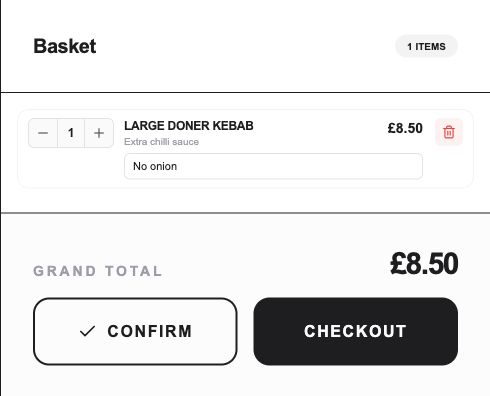
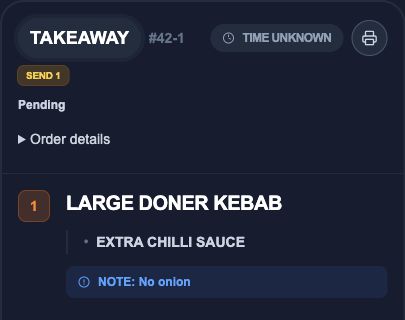
Real POSMENTOR interface components rendered locally with the same illustrative order data. These captures show the two views; they are not evidence of a transmitted order, a payment or a physical print. The displayed unknown time is not a measured preparation time.
Then order a second kebab with different instructions. Verify that its sauce and notes stay on its own line. For a meal deal, confirm the included side and drink rather than assuming separately added items qualify for the deal.
Work through the counter, kitchen and collection checks
On a small screen, scroll the table sideways to read every column.
| Check | Ask the demonstrator to do this | Record before choosing |
|---|---|---|
| Menu and price | Choose the required size, add a priced extra and a preparation note. | The service price, extra charge and final total match your written menu. |
| Two different meals | Add the same product again with a different sauce or note. | Each line retains its own configuration. |
| Kitchen handover | Send the order through the demo workflow and inspect the kitchen view. If printing is proposed, print it too. | Item, quantity, extra and note are readable on the equipment you will use. A screen preview does not prove physical printing. |
| Unpaid collection | Leave the order unpaid, return to it and check its items and payment status. | Staff can identify the correct order. Check notes again: do not assume every view retains every detail. |
| Changes after sending | Ask how to handle one addition and one correction after the kitchen has started. | Who receives the change, which copy is current and how duplicate preparation is avoided. Do not assume an old printed ticket updates. |
| Payments | Use the agreed test method and discuss an interrupted or unconfirmed terminal result. | How staff check the original result before trying another payment. Terminal model and merchant eligibility remain separate checks. |
| Other order channels | Review an own-site or marketplace order only if it is part of your proposal. | Which connection was actually demonstrated and which still requires account activation or provider approval. |
Use a simple demo record
For each check, write Demonstrated, Needs configuration or Not demonstrated, followed by the device or screen used and the next action. “Available” in a brochure is not the same as seeing it work with your menu.
Copy this line into your notes for each unresolved item: Check / observed result / equipment used / person responsible / next check date. Agree the missing checks before setting a changeover date.
For POSMENTOR, line notes are shown in the kitchen workflow, but some dispatch and reopened-order views do not reliably retain every line note. Include the packing handover in your demo, especially when similar meals have different instructions. An order note is not an allergy assessment.
Make the quote cover the setup you just saw
Ask for the plan, device counts, kitchen equipment and enabled order channels in writing. Separate software charges from hardware, payment fees, marketplace agreements and domain costs. A fee with no answer remains unknown.
Use the supplier quote comparison table alongside this checklist. If you are deciding between paper and a screen, read kitchen display vs kitchen printer.
Explore POSMENTOR for takeaways, check equipment compatibility and current software plans. Bring one order from your menu and we can agree what to demonstrate.